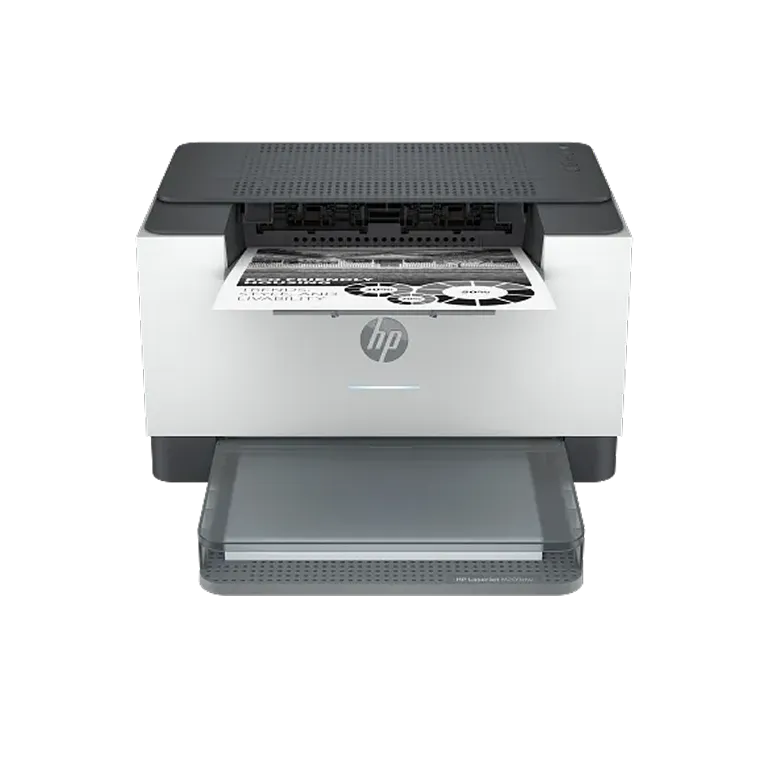

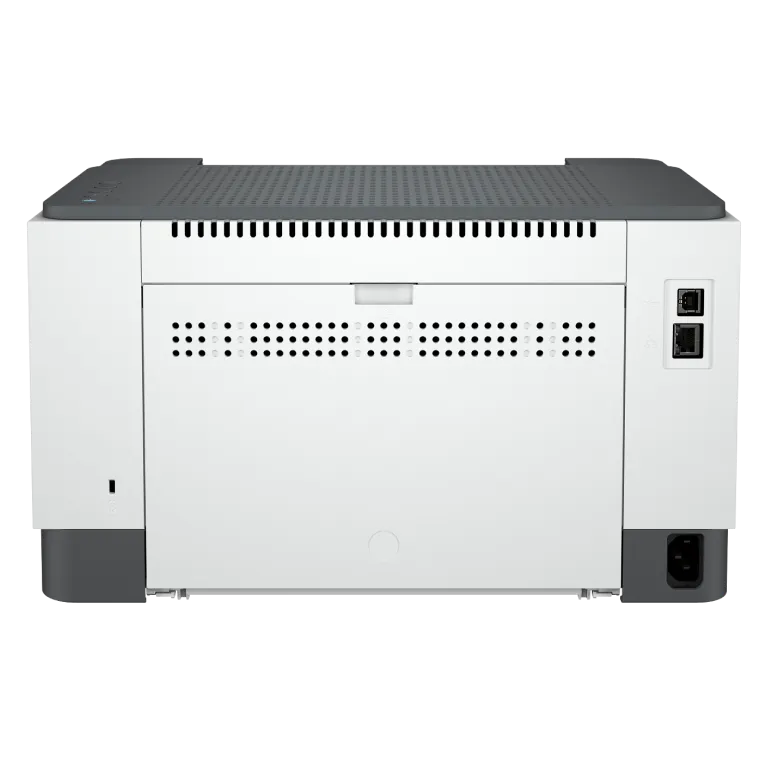

HP LaserJet M209dw Printer
Increase productivity with this high-performance black-and-white printer in an award-winning compact design.[2] Experience the fastest two-sided printing in class[6] and reliable Wi-Fi with self-reset,[7, 11] plus simplified setup and time-saving features with the HP app.[1,3]
Built for fast and reliable printing
Deliver multipage documents in a flash with the fastest two-sided printing in class.[6] Rely on consistent, high-quality prints page after page. Get the quality you expect from an industry leader. Stay connected with reliable dual-band Wi-Fi® that automatically reconnects to stay online.[7,11]
Award-winning design to fit your workspace[2]
Small in size but big in performance, an impressive combination of advanced power and award-winning design.[2] Save space and reduce clutter with a modern sleek design that fits your workspace. You can fit this LaserJet almost anywhere. Get projects done quickly with this high-performance compact printer.
Easy to set up, easy to use
Get started fast with easy setup guidance from the HP app.[1] Quickly setup and get back to business. Get time-saving Shortcuts, plus access and print documents and images from your mobile devices, with the easiest-to-use HP app.[8,11] Easily connect your printer to your computer with the built-in USB port.
Overview
[1] Requires HP app download available at https://www.hp.com/go/mobileprinting . Certain features are available in English language only, and may vary by printer model/country, and between desktop/mobile applications. HP reserves the right to introduce charges for use of functionality facilitated by the HP app. Internet access required and may not be available in all countries. HP account required for full functionality. Fax capabilities are for sending a fax only. List of supported operating systems available in app stores. See details at https://www.hpsmart.com
[2] https://www.red-dot.org/project/hp-laserjet-printer-series-52406
[3] Based on internal HP testing. Average timing estimate based on: 1) downloaded HP app on mobile or desktop device, 2) setting up Shortcut, 3) scanning jobs which have more than 2-3 tasks associated with them (scan to email, save and rename, store to cloud, etc.). Average timing savings comparison based on using printer and desktop scan software to complete similar scanning tasks. Requires the HP app download and supported HP printer. For details on local printing requirements see https://www.hp.com/go/mobileprinting
[4] HP Auto-On/Auto-Off Technology capabilities subject to printer and settings; may require a firmware upgrade.
[5] This HP printing system is awarded the Blue Angel according to DE-UZ 219 in commercial use for the following 33 countries: Germany, Austria, Switzerland, France, United Kingdom, Ireland, Sweden, Denmark, Finland, Norway, Belgium, Netherlands, Luxembourg, Italy, Spain, Portugal, Poland, Czech Republic, Slovakia, Slovenia, Hungary, Croatia, Romania, Bulgaria, Greece, Estonia, Latvia, Lithuania, Serbia, Turkey, Israel, Morocco, South Africa.
[6] Compared to in-class monochrome duplex laser printers less than $149 USD and 129€ EUR and duplex laser MFPs less than $229 USD and 199€ EUR. Exact HP printer speeds vary depending on the system configuration, software application, driver, and document complexity. Keypoint Intelligence March 2024 study commissioned by HP, based on research of OEM-published specifications and publicly available information as of March 2024. Market share as reported by IDC for Q4 2023 for North America and Europe. For details: keypointintelligence.com/HPFastestDuplexM200
[7] Internet access required and must be purchased separately. Wireless operations are compatible with 2.4 GHz and 5.0 GHz operations only. Supports both 5.0 GHz and 2.4 GHz using up to 12 non-overlapping channels vs. only 3 non-overlapping channels for 2.4 GHz only. Supports 5.0 GHz band (up to 150 mbps) v. 2.4 GHz band (up to 72.2 mbps). Learn more at: https://www.hp.com/go/mobileprinting
[8] Compared to OEM printing apps for the majority of top-selling, network-capable inkjet/laser printers and all-in-ones for the home and office, priced ≤$450 USD. Printers selected by market share as reported by IDC Quarterly Hardcopy Peripherals Tracker – Final Historical CYQ1 2023. Claim based on research of printer manufacturer’s print apps and Keypoint Intelligence hands-on testing and study commissioned by HP, July 2023. For details, please see: https://www.keypointintelligence.com/HPSmartapp
[9] Program availability varies. Original HP cartridge return and recycling is currently available in more than 60 countries, territories and regions in Asia, Africa, Europe, and North and South America through the HP Planet Partners program. For details, see https://www.hp.com/recycle
Specifications
[1] For yield information on the cartridge included with your printer, see http://www.hp.com/go/toneryield . Yield values measured in accordance with ISO/IEC 19752 and continuous printing. Actual yields vary considerably based on images printed and other factors.
[2] HP Auto-On/Auto-Off Technology capabilities subject to printer and settings; may require a firmware upgrade.
[3] Requires the HP app download. For details on local printing requirements see www.hp.com/go/mobileprinting. Certain features/software are available in English language only, and differ between desktop and mobile applications. Instant Ink subscription may be required. Instant Ink not available in all countries. See details at www.hptonerservice.com. Internet access required and must be purchased separately. HP account required for full functionality. List of supported operating systems available in app stores. Fax capabilities are for sending a fax only, and may require additional purchase. For more information, see: www.hpsmart.com/mobile-fax.
[4] Power requirements are based on the country/region where the printer is sold. Do not convert operating voltages. This will damage the printer and void the product warranty. Energy Star value typically based on measurement of 115V device.
[5] Based on the Blue Angel TEC method with the following possible exceptions: 1 minute or less sleep delay setting, Wi-Fi disabled.
[6] Declared yields based on ISO/IEC 19752 and continuous printing. Actual yields vary considerably based on images printed and other factors. For details see http://www.hp.com/go/toneryield .
[7] Declared yield value in accordance with ISO/IEC 19752 and continuous printing. Actual yields vary considerably based on images printed and other factors. For details see http://www.hp.com/go/learnaboutsupplies.
[8] Wireless operations are compatible with 2.4 GHz and 5.0 GHz operations only. Learn more at hp.com/go/mobileprinting. Apple Airprint -Mobile device must have AirPrint®. Wi-Fi Direct® printing- Feature is supported on select printers. Mobile device needs to be connected directly to the signal of a Wi-Fi Direct® supported MFP or printer prior to printing. Depending on mobile device, an app or driver may also be required. For details, see hp.com/go/mobileprinting. Wi-Fi Direct is a registered trademark of Wi-Fi Alliance®. The Mopria® Logo is a registered and/or unregistered trademark of Mopria Alliance, Inc. in the United States and other countries, unauthorised use is strictly prohibited. Requires the HP app download. For details on local printing requirements see hp.com/go/mobileprinting. Certain features/software are available in English language only, and differ between desktop and mobile applications. Internet access required and must be purchased separately. HP account required for full functionality. Fax capabilities are for sending a fax only, and may require additional purchase. For more information, see: hpsmart.com/mobile-fax
[9] Measured using ISO/IEC 24734, excludes first set of test documents. For more information see http://www.hp.com/go/printerclaims. Exact speed varies depending on the system configuration, software application, driver, and document complexity.
[10] Measured using ISO/IEC 24734 Feature Performance Test, excludes first set of test documents. For more information see http://www.hp.com/go/printerclaims . Exact speed varies depending on the system configuration, software application, driver, and document complexity.
[11] Measured using ISO/IEC 17629. For more information see http://www.hp.com/go/printerclaims. Exact speed varies depending on the system configuration, software application, driver, and document complexity.
[12] Duty cycle is defined as the maximum number of pages per month of imaged output. This value provides a comparison of product robustness in relation to other HP LaserJet or HP Color LaserJet devices, and enables appropriate deployment of printers and MFPs to satisfy the demands of connected individuals or groups.
[13] HP recommends that the number of printed pages per month be within the stated range for optimum device performance, based on factors including supplies replacement intervals and device life over an extended warranty period.
[14] Not supporting Windows® XP (64-bit) and Windows Vista® (64-bit) Full solution software available only for Windows 10 and newer; For Windows Server 2016 64-bit only print driver is installed; Linux systems use in-OS HPLIP software.
[15] Configuration tested for M207dw model: simplex printing, A4 paper at an average of 27ppm. Configuration tested for M209d model: simplex printing, A4 paper at an average of 29ppm.
Legal disclaimer
Product image may differ from actual product
How the HP LaserJet M209dw Printer…
Modern document environments increasingly rely on wireless accessibility, faster operational workflows, and organized printing…
Read More
Why the HP LaserJet M209dw Printer…
Modern operational environments continue requiring printing systems capable of maintaining organized document workflows,…
Read More
Exploring the Workflow Features of…
Modern document workflows increasingly depend on systems capable of supporting operational consistency, connected accessibility,…
Read More
How the HP LaserJet M209dw Printer…
Everyday document environments require printing systems capable of maintaining operational reliability, organized workflow…
Read More